Work-From-Home Comfort: 3 Upgrades Under $150
Working from home has a comfort problem. The chair is a kitchen chair, the desk is a table, and by 3pm your back hurts and your feet are cold. The upgrades that fix this are usually more expensive than they should be — which is why most people put up with the discomfort rather than buying anything.
This guide is for anyone who works from home regularly and wants to be more comfortable without spending $500 on an ergonomic chair. We've picked three upgrades at different price points and for different problems: warmth, posture and foot comfort. We haven't tested them. What we've done is check what the brands state about materials, sizing and setup, what buyers report, and the fine print that decides whether an upgrade is worth the money.
Some links to this page earn us a commission. It doesn't change what we recommend. How that works.
Our take
Pick | Upgrade | Price | Best for | Setup |
Best overall | The Oodie Original | ~$55–$75 | Staying warm without heating | None — wear it |
Best for posture | Standing desk converter | ~$100–$150 | Breaking up sitting | Minimal — place on desk |
Best for feet | Ergonomic footrest | ~$30–$50 | Foot and lower back comfort | None — place under desk |
What to look for in a work-from-home upgrade
Fix the biggest problem first. If you're cold, warmth is the priority. If your back hurts, posture is the priority. If your feet ache, a footrest is the priority. Don't buy a standing desk if the problem is cold feet.
Buy for your actual setup. A standing desk converter needs a desk with enough space. A footrest needs enough room under the desk. Check the dimensions before you buy.
Comfort upgrades should be easy to use. The best upgrade is the one you'll actually use every day. A complicated setup that takes five minutes to adjust won't get used.
The most common mistake: buying an expensive ergonomic chair without fixing the basics. A footrest, a warm layer and a standing break often solve the problem for a fraction of the price.
The 3 upgrades
The Oodie Original

Price and retailer: Around $55–$75 at The Oodie. Prices change, so check before ordering.
What it is: An oversized hooded blanket made from a sherpa-lined fleece, worn like a giant hoodie. It has a kangaroo pocket, a hood and long sleeves.
Why it made the list: This is the upgrade for anyone who works from home in a cold house. It's warmer than a hoodie, it covers your legs, and it means you can turn the heating down. It's not elegant, but it's the thing you'll wear every day from November to March.
What buyers say: The Oodie gets strong feedback for warmth and softness. The recurring note is sizing — it's genuinely oversized, so check the size guide. It's also not designed for outdoor wear.
Fine print: Check the size guide. Machine washable on a gentle cycle. Check the delivery cut-off if you're buying before winter.
Good:
· Genuinely warm
· Covers your legs
· Around $55–$75
Weigh up:
· Not for outdoor wear
· Oversized by design
Standing Desk Converter
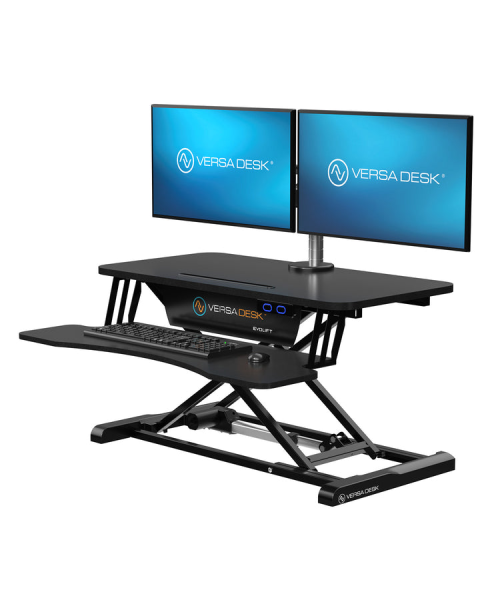
Price and retailer: Around $100–$150 at Amazon and office retailers. Prices change, so check before ordering.
What it is: A platform that sits on top of your desk and raises your laptop or monitor to standing height. Most models adjust between sitting and standing, and some have a keyboard tray.
Why it made the list: Sitting all day is the biggest comfort problem in working from home. A standing desk converter lets you break up sitting without buying a full standing desk, and it's cheaper than an ergonomic chair. It's the upgrade that makes the most difference to how you feel by the end of the day.
What buyers say: Standing desk converters get positive feedback for build quality and ease of use. The recurring note is stability — cheaper models can wobble when raised. Check the weight capacity and the reviews for stability.
Fine print: Check the dimensions against your desk. Check the weight capacity. Check whether it has a keyboard tray. Assembly is usually minimal.
Good:
· Breaks up sitting
· Cheaper than a standing desk
· Adjustable height
Weigh up:
· Cheap models can wobble
· Takes up desk space
Ergonomic Footrest
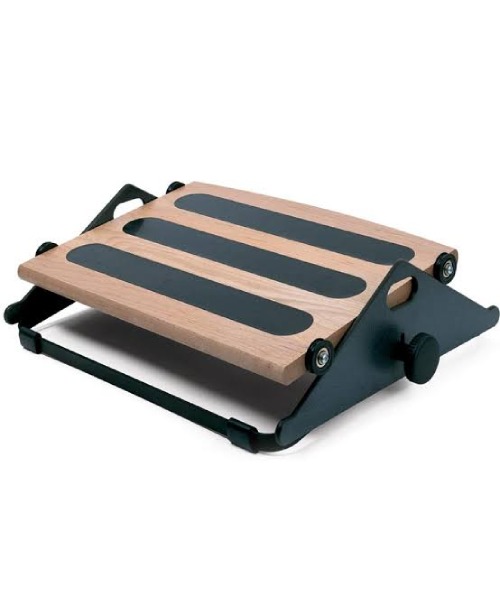
Price and retailer: Around $30–$50 at Amazon and office retailers. Prices change, so check before ordering.
What it is: A footrest that sits under the desk, usually adjustable for height and angle. It supports the feet and takes pressure off the lower back.
Why it made the list: This is the cheapest upgrade here and one of the most effective. A footrest improves posture and reduces lower back pain by raising your feet to a comfortable angle. It's the upgrade most people don't think of, and it's the one that makes the biggest difference for the money.
What buyers say: Footrests get positive feedback for reducing lower back pain and improving comfort. The recurring note is that cheap models can be flimsy — check the weight capacity and the reviews for build quality.
Fine print: Check the height and angle adjustment. Check the weight capacity. Check the dimensions to make sure it fits under your desk.
Good:
· Around $30–$50
· Improves posture and reduces back pain
· Easy to set up
Weigh up:
· Cheap models can be flimsy
· Takes up space under the desk
How to set up a comfortable work-from-home space
Raise your screen to eye level. A laptop stand or a stack of books stops you looking down all day.
Put your feet flat. A footrest or a box under the desk keeps your feet supported and your back straighter.
Stand up every hour. A standing desk converter or a reminder to stand makes more difference than any chair.
Keep warm. A warm layer means you can turn the heating down and still be comfortable.
Who should skip these
If your main problem is back pain, see a physio before buying equipment — an upgrade won't fix a medical issue. If you have a small desk, a standing desk converter may not fit. And if you work from home occasionally rather than daily, the Oodie is the only upgrade worth buying.
Questions
What's the best work-from-home upgrade under $150?
A standing desk converter or an ergonomic footrest. Both make a bigger difference than a new chair for the money. The Oodie is the best value if you're cold.
Do standing desk converters work?
Yes, if you use them. The benefit comes from alternating sitting and standing, not from standing all day. Use it for part of the day rather than all of it.
Are footrests worth it?
Yes, if your feet don't reach the floor comfortably or your lower back aches. A footrest improves posture and reduces pressure on the lower back.
How do you stay warm working from home?
A warm layer like the Oodie, plus a blanket and slippers. Turning the heating down and wearing a warm layer is cheaper than heating the whole house.
What's the best desk setup for working from home?
Screen at eye level, feet flat, elbows at 90 degrees, and a chair that supports your back. A standing desk converter and a footrest fix most of the common problems.
The bottom line
If you're cold, choose The Oodie. If you sit all day, a standing desk converter is the posture upgrade. And if your feet ache, an ergonomic footrest is the cheapest fix.
Fix the biggest problem first, and buy the upgrade you'll actually use. That's how working from home gets more comfortable.